
Nuclei is a fast, template-driven vulnerability scanner from ProjectDiscovery. Its strength is a large library of community YAML templates plus the ability to write your own checks. This guide covers safe scanning, tuning, chaining Nuclei into a recon pipeline, and authoring custom templates — all for targets you are authorized to test.
Installation
# Go
go install -v github.com/projectdiscovery/nuclei/v3/cmd/nuclei@latest

# or download a release binary, then fetch the templates
nuclei -update-templates
nuclei -version
A safe first scan
Start non-intrusive. Exclude anything that fuzzes, floods or attempts logins.
nuclei -u https://staging.example.com \
  -exclude-tags intrusive,dos,fuzz,brute \
  -severity low,medium,high,critical \
  -rate-limit 50 \
  -o nuclei_report.txt
Some templates are intrusive by design. Exclude the dos, fuzz, intrusive and brute tags, set a rate limit, and agree a testing window with the system owner before running against anything live.
Selecting what to run
# By tag (e.g. only CVEs and misconfigurations)
nuclei -u https://staging.example.com -tags cve,misconfiguration

# By template path
nuclei -u https://staging.example.com -t http/technologies/

# By severity only
nuclei -l targets.txt -severity high,critical
Chaining a recon pipeline
Nuclei shines at the end of a discovery pipeline built from other ProjectDiscovery tools, against assets in your scope.
# Subdomains -> live hosts -> scan, staying inside an authorized scope
subfinder -d example.com -silent \
  | httpx -silent \
  | nuclei -exclude-tags intrusive,dos -severity medium,high,critical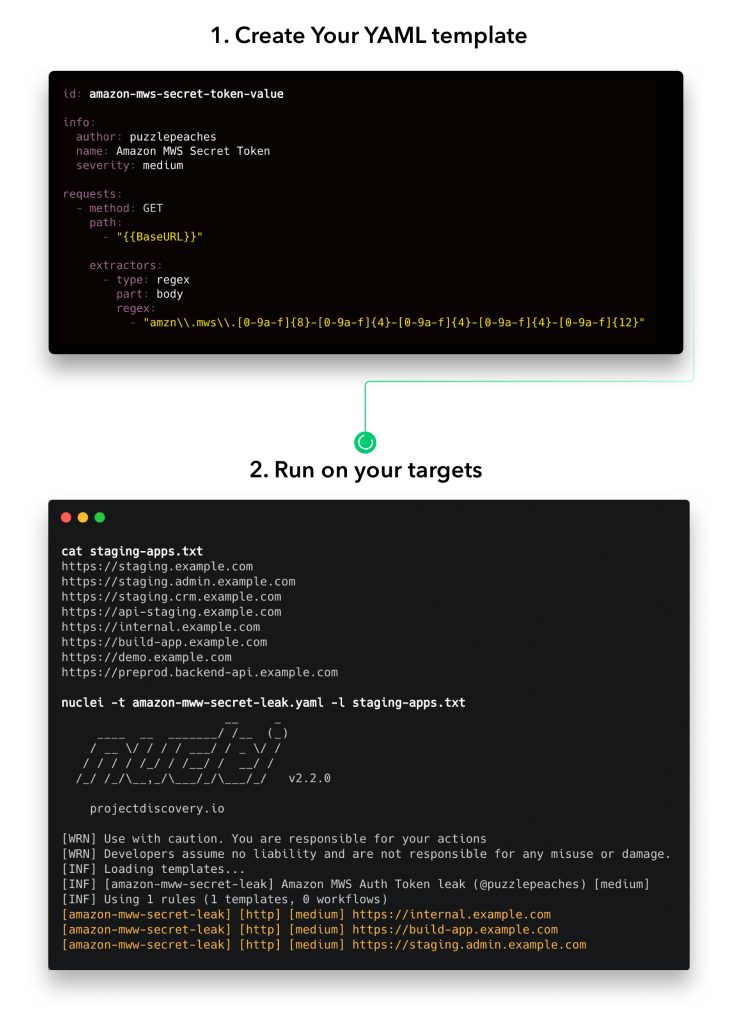
Writing a custom template
Templates are YAML. Here is a safe check that flags a missing security header — useful for your own apps.
id: missing-hsts-header

info:
  name: Missing Strict-Transport-Security header
  author: pentestwiki
  severity: low
  tags: misconfig,headers

http:
  - method: GET
    path:
      - "{{BaseURL}}"
    matchers-condition: and
    matchers:
      - type: status
        status:
          - 200
      - type: word
        part: header
        words:
          - "Strict-Transport-Security"
        negative: true
# Validate and run your template
nuclei -validate -t missing-hsts-header.yaml
nuclei -u https://staging.example.com -t missing-hsts-header.yamlReducing false positives
- Prefer templates with strong matchers — status and body and header conditions together.
- Manually verify every
highorcriticalresult before it goes in a report. - Keep templates current with
nuclei -update-templates. - Use
-rate-limitand-c(concurrency) responsibly so you don’t disrupt the target.
Key takeaways
- Start non-intrusive: exclude
dos,fuzz,intrusiveandbrute, and rate-limit. - Filter by tag and severity so you run only what’s relevant.
- Chain subfinder → httpx → nuclei for scope-wide coverage.
- Custom YAML templates let you codify your own checks; always verify high-severity hits by hand.
Frequently asked questions
Is Nuclei safe to run against production?
Most templates send benign requests, but some are intrusive or fuzzing-based. Exclude tags such as dos, fuzz and intrusive, set rate limits and agree on a testing window with the system owner.
How do I reduce false positives?
Use templates with strong matchers (status plus body plus header conditions), verify every high or critical result manually and keep templates updated with nuclei -update-templates.

PentestWiki Team
The pentestwiki.org editorial team: practising penetration testers, red teamers and smart contract auditors who write, test and peer-review every tutorial before publication.