
The OWASP Top 10 is the most widely referenced awareness document in application security. For a penetration tester it is a shared vocabulary with developers and a checklist for prioritising a web assessment. This guide walks through all ten 2021 categories: what each risk means, how we test for it during an authorized engagement, and how developers should fix it.
The Top 10 is an awareness document, not a complete methodology. Pair it with the OWASP Web Security Testing Guide (WSTG) for procedure and the ASVS for verification requirements.
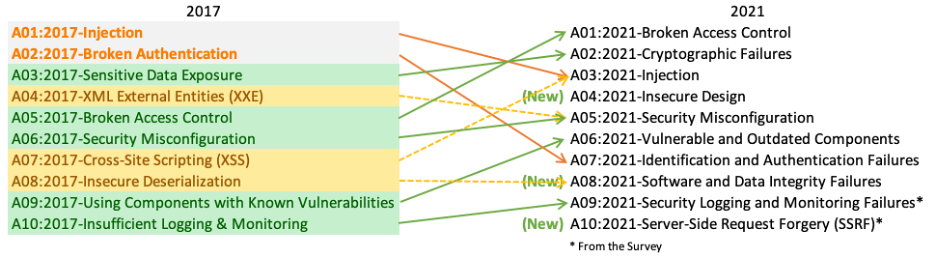
A01:2021 — Broken Access Control
Access control enforces what an authenticated user is allowed to do. It moved to the number one position because it was the most common serious finding in the contributed data set. Typical flaws are Insecure Direct Object References (IDOR), missing function-level authorization, and trusting client-side role checks.
How we test it: we log in as two users of different privilege levels, capture a request that returns one user’s data, and replay it as the other user, changing only the identifier. If user A can read or modify user B’s object, access control is broken. We also request admin-only endpoints as a low-privileged user and check whether the server — not just the UI — refuses them.
How to fix it: enforce authorization on the server for every request, deny by default, and base checks on the authenticated session rather than any value the client can change. Use opaque or ownership-checked identifiers and log access-control failures.
A02:2021 — Cryptographic Failures
Previously “Sensitive Data Exposure”. The root cause is usually data that should be protected in transit or at rest but isn’t, or is protected with weak algorithms.
How we test it: we confirm TLS is enforced site-wide (including HSTS), look for sensitive data sent over plain HTTP or placed in URLs, check for weak hashing of passwords, and review whether secrets end up in logs, caches or backups.
How to fix it: enforce HTTPS with HSTS, hash passwords with a memory-hard function such as Argon2id or bcrypt, use authenticated encryption for stored secrets, and classify data so you know what actually needs protection.
A03:2021 — Injection
Injection (SQL, NoSQL, OS command, LDAP, and cross-site scripting, now folded in here) happens when untrusted input is interpreted as code or query structure.
How we test it: we send inputs that would change the meaning of a query or command only if the application concatenates them unsafely, and we watch for errors, timing differences, or reflected content. For XSS we check whether user input is rendered back into HTML, attributes or JavaScript without context-aware encoding.
How to fix it: use parameterised queries / prepared statements, never build queries by string concatenation, validate input against an allow-list, and apply output encoding appropriate to the context. A strong Content-Security-Policy is defence in depth against XSS.
A04:2021 — Insecure Design
A new category that captures flaws in the design itself — missing or ineffective controls that no amount of clean implementation can fix. Examples: a password-reset flow with no rate limit, or a business process that trusts the client to enforce a limit.
How we test it: we threat-model the critical flows and ask what an abuser would do. Testing here is less about payloads and more about logic: can a workflow be skipped, replayed, or raced?
How to fix it: threat model early, write abuse cases alongside use cases, and build security requirements (rate limits, segregation, limits on value) into the design before coding.
A05:2021 — Security Misconfiguration
Default accounts, verbose errors, unnecessary features enabled, missing security headers, or an over-permissive cloud bucket.
How we test it: we review HTTP responses for stack traces and version banners, check for default credentials on admin panels, and confirm the presence of security headers. Automated scanners like Nuclei are effective here.
How to fix it: harden by default, remove unused components, automate configuration so every environment is consistent, and review cloud resource permissions.
A06:2021 — Vulnerable and Outdated Components
Running a library or framework with known vulnerabilities.
How we test it: we fingerprint component versions and compare against public advisories. In a white-box review we run software-composition analysis over the dependency manifest.
How to fix it: maintain an inventory (an SBOM), subscribe to advisories, patch on a schedule, and remove dependencies you don’t use. See our Trivy guide for automating this.
A07:2021 — Identification and Authentication Failures
Weak passwords permitted, credential stuffing not mitigated, session identifiers exposed or not rotated, weak multi-factor implementation.
How we test it: we check password policy, whether accounts lock or throttle after repeated failures, whether session tokens are invalidated on logout and rotated on login, and whether MFA can be bypassed.
How to fix it: support long passphrases and screen them against breach lists, add rate limiting and MFA, and manage sessions server-side with secure cookie attributes.
A08:2021 — Software and Data Integrity Failures
Trusting code, updates or data without verifying integrity — for example an auto-update mechanism without signature verification, or insecure deserialization.
How we test it: we review update and CI/CD pipelines for signing and verification, and look for deserialization of attacker-controllable data.
How to fix it: verify digital signatures on updates and dependencies, pin and review third-party build steps, and avoid deserializing untrusted data.
A09:2021 — Security Logging and Monitoring Failures
Without logging and alerting, breaches go unnoticed. This category is about the ability to detect and respond.
How we test it: during an engagement we note whether our own testing generated any detectable signal, and we review whether authentication, access-control and server-side failures are logged.
How to fix it: log security-relevant events with enough context, centralise and protect logs, and alert on suspicious patterns. Test your detection with tabletop exercises.
A10:2021 — Server-Side Request Forgery (SSRF)
SSRF occurs when an application fetches a remote resource from a URL the user controls, letting an attacker make the server request internal systems.
How we test it: wherever the app fetches a URL (webhooks, image importers, PDF generators) we point it at a controlled, out-of-band endpoint we own and watch for a callback that proves the server made the request.
How to fix it: validate and allow-list destinations, resolve and check addresses to block internal ranges, disable unused URL schemes, and isolate the fetching service.
Key takeaways
- Broken Access Control is the most common serious finding — always test with multiple user roles.
- Scanners find injection, misconfiguration and outdated components well; access control, insecure design and business logic need manual testing.
- Map every finding to a Top 10 category so developers immediately understand the risk and the fix.
- The Top 10 prioritises and communicates; the WSTG and ASVS give you procedure and verification depth.
Frequently asked questions
What is the OWASP Top 10?
The OWASP Top 10 is a consensus document published by the Open Worldwide Application Security Project that ranks the most critical security risks to web applications, based on data contributed by security vendors and a community survey.
Is the OWASP Top 10 a testing methodology?
No. It is an awareness document. For a full methodology use the OWASP Web Security Testing Guide (WSTG) and, for verification requirements, the OWASP ASVS. The Top 10 is a good way to prioritise and communicate risk.
Which OWASP Top 10 category is most common?
Broken Access Control has been ranked first since the 2021 edition; it was found in the large majority of tested applications. In practice IDOR and missing function-level authorization are the most frequent findings in web pentests.
Can automated scanners find all OWASP Top 10 issues?
No. Scanners such as OWASP ZAP or Nuclei are good at injection, misconfiguration and known vulnerable components, but access control, insecure design and business logic flaws require manual testing with multiple user roles.

PentestWiki Team
The pentestwiki.org editorial team: practising penetration testers, red teamers and smart contract auditors who write, test and peer-review every tutorial before publication.