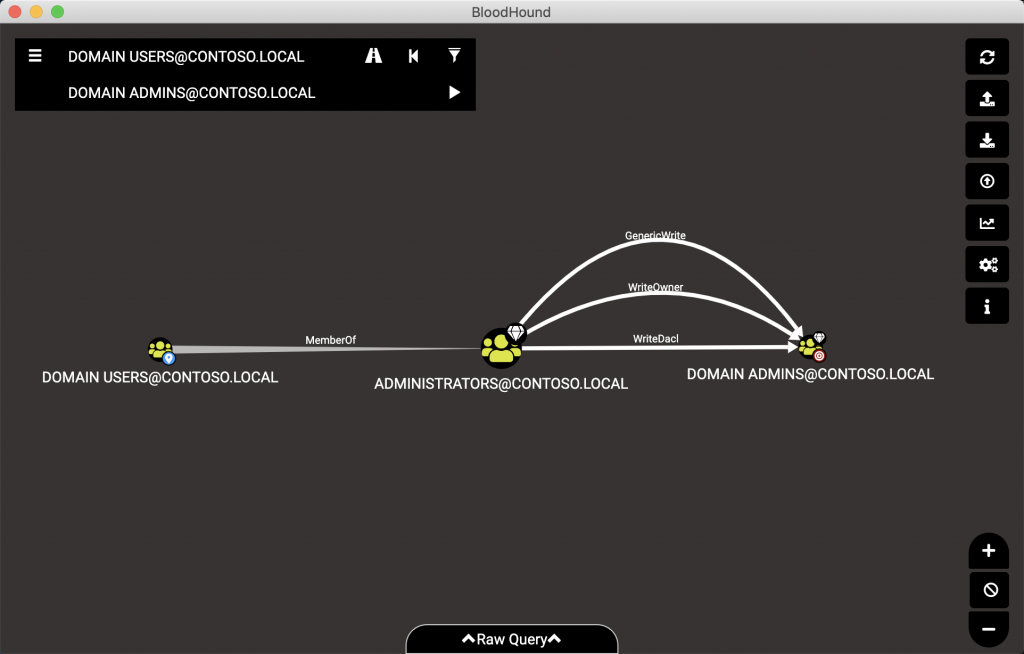
BloodHound models Active Directory and Entra ID as a graph, revealing privilege-escalation paths that are invisible in a list of group memberships. It is used by red teams to find routes to high-value targets and by defenders to remove those same routes. This guide explains the data model, authorized collection, the edges that matter, and how blue teams act on the results.
Collection touches many systems and is detectable. Run it only inside an engagement with a signed scope and rules of engagement, and inform the SOC when required.
Why a graph?
Active Directory privilege is transitive. A user is in a group, that group has rights over a computer, that computer has a logged-on admin, that admin is in another group… Individually each relationship looks benign; chained together they form a path from an ordinary user to Domain Admin. BloodHound uses graph theory to find the shortest such paths automatically.
Nodes and edges
Nodes are objects — Users, Groups, Computers, OUs, GPOs, Domains. Edges are relationships — and the interesting ones are the rights that allow control:
| Edge | Meaning |
|---|---|
MemberOf |
Group membership (transitive privilege). |
AdminTo |
Principal is local admin on a computer. |
HasSession |
A user has a session on a computer (credential exposure). |
GenericAll / GenericWrite |
Full / write control over an object — often a takeover primitive. |
ForceChangePassword |
Can reset another user’s password. |
DCSync (GetChanges/All) |
Can replicate secrets from the domain controller. |
Authorized data collection
SharpHound (or the cross-platform collectors) gathers the data as an authenticated domain user and produces JSON that you import into BloodHound.
# Run collection as a domain user within the engagement
SharpHound.exe --collectionmethods All --outputdirectory .\loot
# Cross-platform collector (Python)
bloodhound-python -u user -p 'REDACTED' -d corp.local -c All -ns 10.0.0.10Default collection performs many LDAP and SMB queries and can be flagged by modern EDR and identity-protection tools. Agree collection method and timing with the client, and prefer targeted methods over All where stealth matters.
Analysing paths
Import the JSON, then use the built-in queries or Cypher. Classic questions:
- “Shortest paths to Domain Admins” — the headline attack path.
- “Find principals with DCSync rights” — anyone who can dump all hashes.
- “Shortest paths from owned principals” — mark what you’ve compromised and see where it leads.
// Example Cypher: users that can reset a Domain Admin's password
MATCH p=(u:User)-[:ForceChangePassword]->(a:User)-[:MemberOf*1..]->(g:Group {name:"DOMAIN [email protected]"})
RETURN p
The blue-team view
The same graph is a remediation tool. Defenders use it to:
- Cut the shortest paths first — removing one well-placed edge can break many paths at once.
- Review dangerous ACLs — unexpected
GenericAll/GenericWritegrants are often misconfigurations. - Reduce admin sprawl — fewer
AdminToandHasSessionrelationships means fewer credential-theft pivots. - Tier your accounts so that Tier 0 (domain controllers, admins) never logs on to lower tiers.
- Re-run collection after changes to confirm the path is gone.
Pair BloodHound with detection engineering: alert on SharpHound-like LDAP query bursts and on DCSync from non-DC hosts. The attack paths you can’t remove immediately should at least be monitored.
Key takeaways
- AD privilege is transitive; BloodHound finds the chained paths a list of memberships hides.
- Edges like
GenericAll,ForceChangePasswordandDCSyncare common takeover primitives. - Collection is noisy and detectable — scope and time it, and inform the SOC when required.
- Defenders use the same graph to cut the shortest paths and tier their accounts.
Frequently asked questions
What is BloodHound used for?
BloodHound uses graph theory to reveal hidden relationships and privilege escalation paths in Active Directory and Entra ID, helping red teams find paths to high-value targets and blue teams eliminate them.
Is SharpHound collection noisy?
Default collection performs many LDAP and SMB queries and can be detected by modern EDR and identity protection tools. Agree collection methods and timing with the client and inform the SOC when required by the rules of engagement.

PentestWiki Team
The pentestwiki.org editorial team: practising penetration testers, red teamers and smart contract auditors who write, test and peer-review every tutorial before publication.